
PPSSPP Gold - PSP emulator
Henrik RydgårdAction
4.51.79K Reviews
- Version
- v1.20.4
- Installs
- 500.00K
- Age Rating
- Everyone
Screenshots
Our Review of PPSSPP Gold - PSP emulator
 Analysis by Appyee
I judge a PSP emulator less by its promises than by how it handles the unglamorous parts: locating game files, getting controls comfortable on a phone, and working out whether a slowdown comes from the app or the device. PPSSPP Gold - PSP emulator is built for bringing PSP games to Android, and Henrik Rydgård’s game sits in the action category. I find it most appealing to people who already have games they can use and are willing to spend a little time adjusting settings rather than expecting every title to feel perfect immediately.
Where setup tends to get stuck
The first hurdle is often not an emulator setting but the game files. PPSSPP is the software that runs PSP games; it does not turn a purchase of the app into a collection of games. Before installing, I’d make sure I understand how I’ll access game files I’m entitled to use and where I can keep them on my device. That simple check can save the frustrating experience of opening an emulator and having nothing ready to launch.
Once files are available, I’d start with one game rather than moving a whole library at once. This makes it easier to tell whether a file is in a location the app can reach and whether the game itself starts. If a title does not appear, I would check the folder I selected and the file’s accessibility before changing graphics options. A missing game and a game that launches poorly are different problems, and treating them separately makes troubleshooting much less confusing.
There is also a practical choice between touch controls and a physical controller. Touch controls make the phone self-contained, but they can cover part of the screen and feel awkward for games that need precise movement or several simultaneous inputs. An external controller may feel more natural if you already own one, though it adds another device to carry and configure. I’d try the built-in controls first, then decide whether a controller solves a real problem for the games I play.
For a first run, I recommend changing one setting at a time. If you alter graphics, controls, and audio together, it becomes difficult to identify which change helped—or caused a new issue. Start with the default experience, note what bothers you, and adjust only that part. This is especially useful on phones, where the best balance can depend on the device and on the demands of a particular game.
Getting Started with PPSSPP Gold
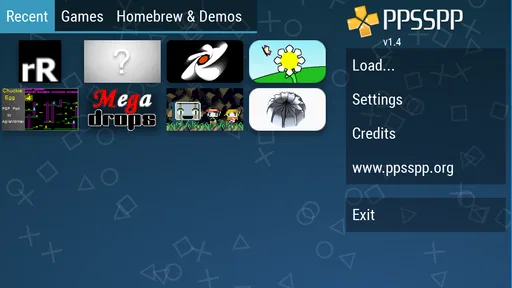
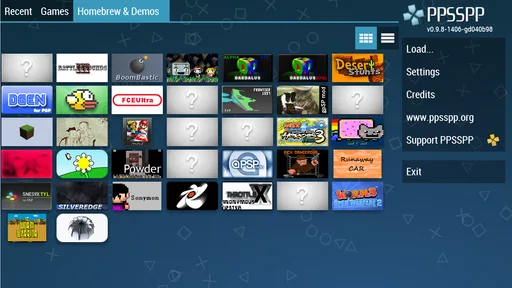
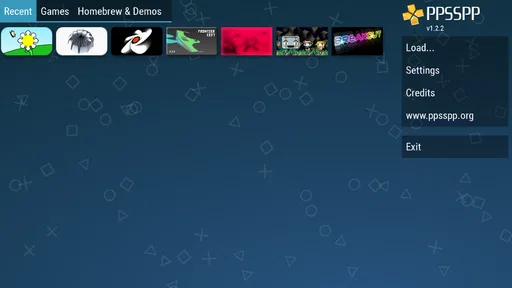
First things first, downloading and setting up the PPSSPP Gold is a breeze. Available for both Android and iOS, it’s a straightforward process. Once installed, you’re greeted with a clean and intuitive interface that’s easy to navigate. The app supports a vast library of PSP games, so you can dive right into your favorites from back in the day.
Jumping into the settings, I was impressed by the level of customization available. You can tweak everything from graphics and controls to audio settings. The emulator even supports external controllers, which is a massive plus for those who prefer that authentic gaming feel.
Performance That Packs a Punch
Now, let's talk performance. The PPSSPP Gold emulator runs buttery smooth on most modern devices. I tested it on a mid-range phone, and it handled games like "God of War: Chains of Olympus" and "Final Fantasy: Crisis Core" with remarkable ease. The graphics are sharp, and the gameplay is fluid, making it easy to forget you’re playing on a mobile device.
The app boasts features like texture scaling and anisotropic filtering, which enhance the graphics significantly. You can even upscale the resolution to match your device's capabilities, giving those classic games a fresh, polished look.
Features That Stand Out
One of the standout features of PPSSPP Gold is its ability to save and load states at any point. This means you can pause your game and pick up right where you left off, which is perfect for those quick gaming sessions on the go.
Another neat feature is the ability to play multiplayer games over local networks. It’s like having a mini-PSP LAN party in your pocket! Plus, the emulator supports various file formats, so loading up your game collection is a hassle-free experience.
Making sessions fit everyday life
Save states are particularly useful when a game’s own save points are far apart or when I have to stop unexpectedly. I would still use a game’s normal save system when possible: a quick state is convenient, but keeping ordinary progress too gives me a more dependable way to return later. Before relying on a state for a long break, I’d test saving and loading in a low-stakes moment so I know the routine works for that game.
A realistic use case is a short commute or a quiet break between errands. I can open a game, make a little progress, save, and put the phone away without needing a long uninterrupted session. That convenience is a better reason to choose an emulator than chasing the highest possible graphics settings. On a small screen, clear controls and reliable progress matter more than extra visual polish.
For local multiplayer, I’d treat setup as something to test before friends are waiting. Both players need a compatible game and a working local connection, and network play can be more sensitive to setup than simply playing alone. If it is important that a session start quickly, I’d test the arrangement in advance and keep a single-player game ready as a fallback. The feature is appealing, but it does not remove the coordination that multiplayer requires.
Graphics options invite experimentation, but higher settings are not automatically better. Upscaling can make older art look clearer on a modern display, while a more demanding configuration may be a poor trade if it causes uneven play or drains attention with constant tweaking. I’d compare a game at its default settings with one careful visual adjustment, then keep the version that feels stable. The useful goal is a comfortable session, not the longest settings menu.
Setup checks and recovering a session
If a game launches but behaves badly, I would first return any recent changes to the graphics or audio settings and test again. Then I’d check whether the issue happens in one title or across several. A problem limited to a single game points toward that game or its file; trouble across the board makes device settings or the emulator configuration more plausible. This small bit of comparison is more informative than changing several options at random.
If progress seems lost, I’d look for the relevant normal save and save state separately rather than assuming they are interchangeable. States capture a moment in an emulated session, while a game’s own save belongs to its internal progression. Naming or organizing files clearly can also help avoid loading the wrong state after trying several games. I would make a cautious test save before replacing any progress I care about.
Storage and organization matter as a library grows. Keeping game files in a folder I can recognize makes it easier to find them again and to distinguish a moved file from a performance fault. If a game disappears after I reorganize files, I’d revisit its location before reinstalling the app or resetting settings. These are modest habits, but they prevent avoidable troubleshooting and make returning to an old title much easier.
When another option is the better fit
Compared with playing on original PSP hardware, an Android emulator offers convenience and the possibility of sharper presentation, but it depends on a phone, suitable game files, and controls that may not feel identical to a dedicated handheld. If I want the original portable device experience with its physical layout, the PSP itself is the more direct choice. If I mainly want to revisit games on a device I already carry, PPSSPP is the more practical route.
Compared with other emulator choices, the key question for me is not which one has the longest list of settings; it is whether it runs the games I care about and fits my device and control preferences. PPSSPP Gold is a focused option for PSP play, not a general solution for every older console. Someone who wants one app for several systems should look for a multi-system alternative instead, while a PSP fan who values configurable graphics and portable sessions has a clearer reason to choose this one.
I would also skip it if I expect every game to work without any setup, if I do not have game files I can use, or if I dislike adjusting touch controls. Emulation adds a layer between the game and the device, so occasional compatibility or performance friction is part of the trade-off. A dedicated console or a simpler way to play may suit someone who wants a completely plug-and-play experience.
Why Go for the Gold Version?
So, you might be wondering, why choose the Gold version over the free one? Well, apart from the satisfaction of supporting the developers, the Gold version offers a slightly smoother experience with fewer ads and early access to new features. It’s a small price to pay for the premium PSP experience.
The developers are continually updating the app, and being a Gold user gives you the edge in receiving these updates first, ensuring you always have the best performance and newest features at your fingertips.
At $4.99, Gold is a paid choice, so I’d weigh that against how often I expect to use it and whether supporting Henrik Rydgård matters to me. The game is rated for Everyone, has a 4.5 average from around 29,000 ratings, and has passed 500,000 installs. Those figures suggest a substantial audience, but they do not guarantee that a particular game will run exactly as I want on my phone. I’d decide based on my own PSP library and willingness to configure the experience.
Practical verdict
The current version is v1.20.3, and it requires Android 5.0 or later. I’d check that requirement before downloading and make sure I have a sensible place for my game files. Those quick checks answer two common questions up front: whether an Android device meets the stated minimum and whether I’m prepared to supply the games I want to play. The app’s appeal is strongest when both are already settled.
All in all, PPSSPP Gold - PSP emulator is a must-have for any gaming enthusiast. It brings the magic of the PSP to your mobile device in a way that’s both accessible and impressive. Whether you’re reliving the glory days or discovering PSP gems for the first time, this emulator delivers an unparalleled experience.
The blend of robust performance, extensive features, and user-friendly design makes it a standout choice in the world of emulation. So, gear up and get ready to dive into a world where gaming nostalgia meets modern convenience. Happy gaming!
Verdict
Strengths of PPSSPP Gold - PSP emulator
- High-quality graphics rendering
- Customizable on-screen controls
- Supports save states and cheats
- Wide compatibility with PSP games
- Regular updates and support
Limitations of PPSSPP Gold - PSP emulator
- Requires powerful device for smooth play
- No built-in game download feature
- Sound emulation can be buggy
- Some games have minor graphical glitches
- Not all PSP games are fully compatible
Other Releases by Henrik Rydgård
View All
PPSSPP - PSP emulator
Action4.4
Similar Picks in This Category
View All
Temple Run 2: Endless Escape
Imangi Studios4.1

PUBG MOBILE
Level Infinite4.3

Free Fire: 9th Anniversary
GARENA INTERNATIONAL I4.4

Talking Tom: Hero Dash Run
Outfit7 Limited4.3

slither.io
Lowtech Studios3.9

Sniper 3D:Gun Shooting Games
Wildlife Studios4.6
Frequently Asked Questions
What is PPSSPP Gold and how does it differ from the free version?
PPSSPP Gold is a premium version of the popular PSP emulator app, PPSSPP. It supports high-definition graphics and enhanced gaming experiences on Android and iOS devices. The Gold version offers additional features and improvements, and purchasing it supports the developers. While the free version is fully functional, the Gold version provides users with a more polished experience.
Can PPSSPP Gold run all PSP games smoothly?
While PPSSPP Gold supports a wide range of PSP games, performance may vary depending on your device's hardware capabilities. High-end devices typically run games more smoothly, with better frame rates and graphics quality. Some games may require specific settings adjustments for optimal performance, but overall, PPSSPP Gold is known for reliable emulation.
What are the system requirements for PPSSPP Gold?
PPSSPP Gold requires an Android or iOS device with decent hardware specifications for optimal performance. It runs best on devices with at least 2GB of RAM and a powerful CPU. The emulator is designed to take advantage of modern hardware, but older devices may experience slower performance or compatibility issues with certain games.
Is it legal to use PPSSPP Gold to play PSP games?
Using PPSSPP Gold to emulate PSP games is legal, but downloading and playing games you do not own is not. To stay within legal boundaries, you should only use game files (ROMs) that you have personally backed up from your own PSP collection. Always ensure you comply with copyright laws in your region.
How do I install and set up PPSSPP Gold on my device?
To install PPSSPP Gold, download it from the official app store on your Android or iOS device. Once installed, you need to transfer your PSP game files onto your device. Open the app and navigate to the folder containing your games. Select a game, configure the settings for optimal performance, and enjoy your gaming experience. Always follow the legal guidelines for game files.
Play our best games!


